Building a server to run "Headless" is a smart way to save money when building a server. When building a headless machine, you don't need to spend extra on a GPU or a CPU with integrated graphics. After the initial setup, you can manage servers remotely using a web interface or SSH (Secure Shell)
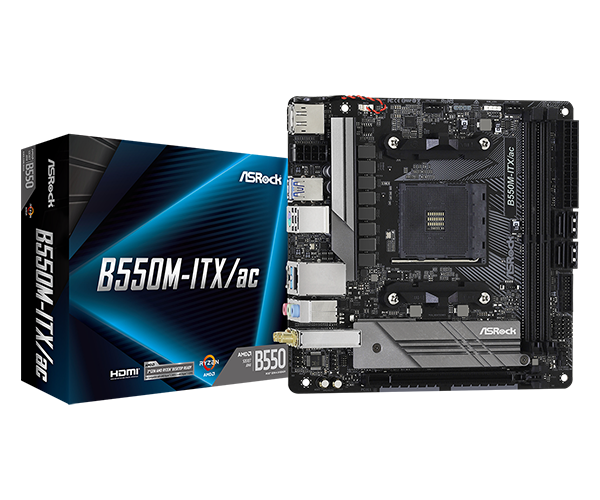
ASROCK B550M-ITX/ac
Image source: ASRock Official product page, https://www.asrock.com/mb/AMD/B550M-ITXac/index.asp
The ASROCK B550M-ITX/AC
This motherboard is my favorite choice for compact AM4 server builds. It is affordable, small, and has every feature I need for building my servers.
This motherboard is in the Mini-ITX form factor, meaning it is only 170 x 170 mm. I am using this motherboard in my home media server. I chose this motherboard specifically because of it's BIOS menu and the ability to run headless without any additional configuration, allowing me to set up and use the computer without any video output.
Official Spec Sheet:
| Specification | Details |
|---|---|
| Processor Socket | Socket AM4 |
| Compatible Devices | Personal Computer |
| RAM Technology | DDR4 |
| Compatible Processors | AMD Ryzen 5000 / 4000 / 3000 Series |
| Chipset | AMD B550 |
| Memory Clock Speed | 2400 MHz |
| Platform | Windows 10 / 11 |
| Memory Capacity | 64 GB |
| Max RAM | 64 GB |
| Main Power Connector | 24-Pin |
| Graphics Interface | PCIe x16 |
| Memory Slots | 2 |
| Total Ports | 11 |
| S/PDIF | Optical |
| Storage Bus | SATA III |
| SATA Ports | 4 |
| USB 2.0 | 1 |
| Total USB Ports | 10 |
| Ethernet Ports | 1 |
| HDMI Ports | 1 |
| PCIe Slots | 1 |
With this motherboard, there are no extra steps necessary to run it headlessly. All you have to do is set up an operating system on the boot drive, assign a static IP, and set up SSH. I installed Ubuntu on the drive prior to installation, so all I had to do was plug my new server in, and it was good to go.
The downside of running a server headlessly is that you have no way of configuring the BIOS without a graphics card or integrated graphics, but this isn't too much of an issue in my case, as I didn't need to configure anything. Another potential downside is losing access if SSH fails or is configured improperly.